
3 Hyperspectral imaging of plant samples
The FS-13 camera was employed as the primary device for hyperspectral imaging of plant specimens. Operating the FS-13 scanning hyperspectral system starts with preparing both the plant samples and the imaging platform. Samples are arranged on a flat, non-reflective surface to minimise glare, with enough spacing between them to prevent overlap and simplify later segmentation. A crucial part of the stage involves placing calibration panels: a white panel for normalising image brightness and a black panel to correct for dark regions and remove background noise. These calibration panels should be placed near the samples and ideally at the same distance from the camera to ensure accurate lighting correction.
Uniform diffuse lighting, typically provided by halogen or other continuous-spectrum light sources, is necessary to achieve reliable spectral measurements. Glare reduction is facilitated by positioning the camera at approximately a 45-degree angle relative to the sample surface. After arranging the platform, the FS-13 camera is connected to a computer via USB-cable, and the accompanying specialized software FigSpec Scan is launched (Figure 7). The software interface is used to establish and verify connections between the camera and the platform, confirming that both are properly recognised and operational.
Next, scanning parameters are set, such as the wavelength range (commonly 400-1000 nm), spatial resolution, scanning speed, and autofocus options if needed. Calibration files for dark reference and white reference (Figure 8) can be applied to assist in radiometric correction of the collected images. The image sharpness can be previewed in real time (“Preview” button) and the focus adjusted manually as required.
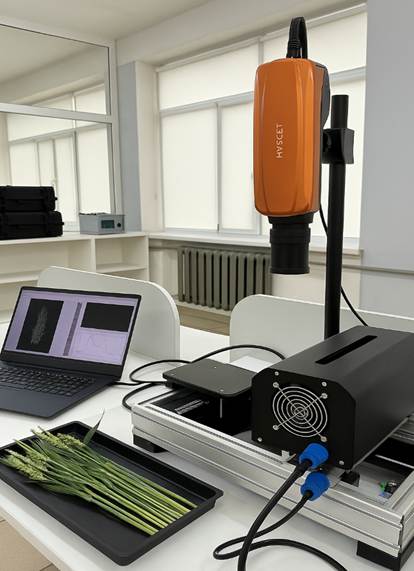
Figure 7 – FS-13 camera connected to a PC during the imaging process
Once the camera and platform are set up, the sample is scanned sequentially, line by line, producing a multidimensional image that captures both spatial detail and spectral information of the specimen (Figure 9).
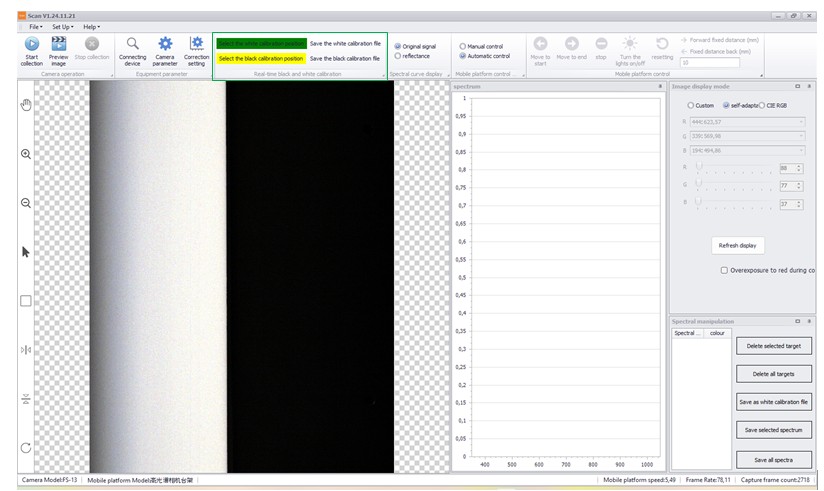
Figure 8 – White and dark calibration references
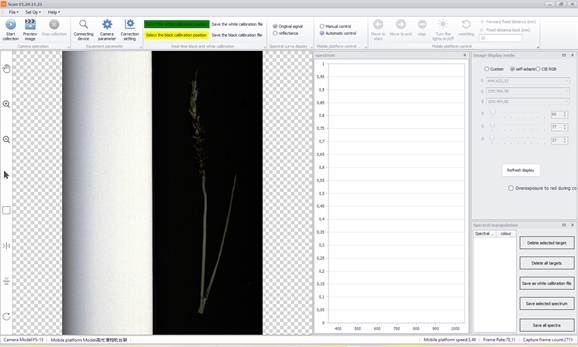
Figure 9 – Multidimensional hyperspectral image generated via line-by-line scanning
The resulting data are saved in common formats such as “.hdr” (which can be used with ENVI or Breeze software) and “.spe”. After acquisition, the hyperspectral dataset is imported into Prediktera’s Breeze software for comprehensive processing and analysis.
Thus, performing hyperspectral imaging with the FigSpec camera involves meticulous sample preparation, careful setup of the equipment, and controlled lighting conditions. Accurate calibration and properly configured scanning settings are critical for capturing high-quality spectral data, which serve as the foundation for in-depth analyses, including identifying plant diseases and other pathological conditions.